








【PowerShell】半角カタカナを全角カタカナに変換する処理をPesterでテストする

はじまり

半角カタカナとかあまり使いたくない
まあ、人に見せるための資料を作る時に、なんとか収めたい時に使うことが無いこともギリ無いですけど・・・。
しかし、自分のメモ用には全角カタカナで一律揃えたいので、どこかのWebサイトから情報を引っ張ってくる時に、文字列の中に含まれている半角カタカナを全て全角カタカナにするツールをPowerShellで作りました。
起動用のバッチを実行すれば、表示されるPowerShellコンソール内に文字列を打ち込めば全角カタカナになります。これをコピーして、貼りたい場所に貼って使用できます。
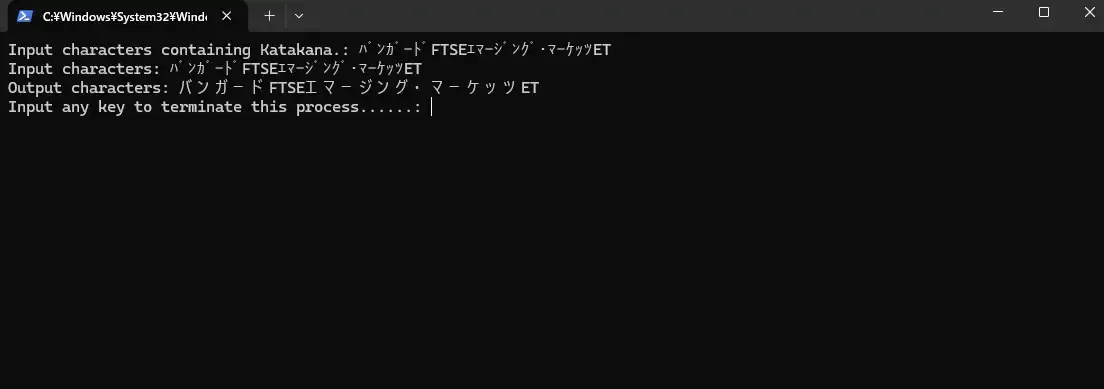
全角カタカナ変換処理のコード
実行ディレクトリの構成はこれを想定しています。
C:.│ Z9-1_convert_to_full_width_kana.bat│ Z9-1_convert_to_full_width_kana.ps1│ Z9-1_convert_to_full_width_kana.Tests.ps1これが今回のツールのコードです。正味の処理は1行しかありません。
function Convert-ToFullWidthKana { param ( [string]$String )
return $String.Normalize([System.Text.NormalizationForm]::FormKC)}
$inputString = Read-Host "Input characters containing Katakana."
if ([string]::IsNullOrWhiteSpace($inputString)) { Write-Host "No input. This process has cancelled." exit 1}
$convertedString = Convert-ToFullWidthKana -String $inputString
Write-Output ("Input characters: {0}" -f $inputString)Write-Output ("Output characters: {0}" -f $convertedString)
$tmp = Read-Host "Input any key to terminate this process......";実行用のバッチの中身はこんな感じです。
@echo offsetlocal
Start /WAIT Powershell -Windowstyle Normal -NoProfile -ExecutionPolicy Unrestricted -File "Z9-1_convert_to_full_width_kana.ps1"
endlocalPesterを動かす。
今回は、「Pester」で動くテストコードも書いてみます。
「Pester」とは、PowerShellスクリプトを単体テストするためのPowerShellに内蔵されているライブラリです。
僕自身、Pesterを使ったことがないので、今回のような単純な処理で使用感を味わってみたいと思います。
 pester.dev
まずは、単体テストをするディレクトリにて、Pesterをインストールします。
Install-Module -Name Pester -Force -SkipPublisherCheck今回のテストコードはこんな感じです。
BeforeAll { $scriptDir = (Get-Location).Path $script = (Split-Path -Leaf $PSCommandPath).Replace(".Tests", "") $script = $scriptDir + "\" + $script . $script}
Describe "Convert-ToFullWidthKana Function Tests" {
# Normal tests Context "When converting half-width Katakana to full-width Katakana" { It "should convert カタカナ to カタカナ" { # Arrange $inputStr = "カタカナ" $expected = "カタカナ"
# Act $result = Convert-ToFullWidthKana -String $inputStr
# Assert $result | Should -Be $expected }
It "should convert ダブルクォーテーション to ダブルクォーテーション" { $inputStr = "ダブルクォーテーション" $expected = "ダブルクォーテーション" $result = Convert-ToFullWidthKana -String $inputStr $result | Should -Be $expected } }
# Abnormal tests Context "When input is empty or invalid" { It "should return an empty string when input is empty" { $inputStr = "" $expected = "" $result = Convert-ToFullWidthKana -String $inputStr $result | Should -Be $expected }
It "should return the original string if no half-width Katakana is present" { $inputStr = "これはテストです。" $expected = "これはテストです。" $result = Convert-ToFullWidthKana -String $inputStr $result | Should -Be $expected } }
# Boundary Value Tests Context "Edge cases" { It "should handle mixed input with half-width and full-width characters" { $inputStr = "ハンカクと全角カタカナ" $expected = "ハンカクと全角カタカナ" $result = Convert-ToFullWidthKana -String $inputStr $result | Should -Be $expected }
It "should handle mixed input with half-width and full-width characters and mixed Japanese and English characters" { $inputStr = "バンガードFTSEエマージング・マーケッツET" $expected = "バンガードFTSEエマージング・マーケッツET" $result = Convert-ToFullWidthKana -String $inputStr $result | Should -Be $expected }
It "should handle numeric and symbol characters without changes" { $inputStr = "12345 &@" $expected = "12345 &@" $result = Convert-ToFullWidthKana -String $inputStr $result | Should -Be $expected } }}それではテストコードを実行してみます。
Invoke-Pester .\Z9-1_convert_to_full_width_kana.Tests.ps1Pesterを実行してみると・・・アレッ。こんなエラーメッセージが表示されて全てのテストが失敗しました。
Starting discovery in 1 files.Discovery found 7 tests in 204ms.Running tests.[-] Convert-ToFullWidthKana Function Tests.When converting half-width Katakana to full-width Katakana.should convert カタカナ to カタカナ 66ms (39ms|26ms)CommandNotFoundException: The term 'Convert-ToFullWidthKana' is not recognized as a name of a cmdlet, function, script file, or executable program.Check the spelling of the name, or if a path was included, verify that the path is correct and try again.at , /home/user/PictureExifOptimizer/codes/Z9-1_convert_to_full_width_kana.Tests.ps1:13[-] Convert-ToFullWidthKana Function Tests.When converting half-width Katakana to full-width Katakana.should convert ダブルクォーテーション to ダブルクォーテーション 24ms (23ms|1ms)CommandNotFoundException: The term 'Convert-ToFullWidthKana' is not recognized as a name of a cmdlet, function, script file, or executable program.Check the spelling of the name, or if a path was included, verify that the path is correct and try again.at , /home/user/PictureExifOptimizer/codes/Z9-1_convert_to_full_width_kana.Tests.ps1:23エラーメッセージで調べてみると、どうやらDescribeブロックの実行前にBeforeAllブロックが必要らしい。
BeforeAll { $scriptDir = (Get-Location).Path $script = (Split-Path -Leaf $PSCommandPath).Replace(".Tests", "") $script = $scriptDir + "\" + $script # Import-Module $script . $script}再びPesterを実行すると・・・、なんか止まった。
Starting discovery in 1 files.Discovery found 7 tests in 43ms.Running tests.Input characters containing Katakana.:あっ・・・、ファイルの中の全てが実行されるのか。だから入力待ちになっている・・・。適当に「v」とか何でもいいので入力します。
すると・・・成功!
[+] /home/userxxxx/PictureExifOptimizer/codes/Z9-1_convert_to_full_width_kana.Tests.ps1 4.19s (4.13s|47ms)Tests completed in 4.19sTests Passed: 7, Failed: 0, Skipped: 0, Inconclusive: 0, NotRun: 0かなり使いやすくて良いですね。
テスト対象をスコープに入れる。
ちなみに、BeforeAllブロックの中でテスト対象のスクリプトファイルを呼び出す処理を行っていますが。
BeforeAll { $scriptDir = (Get-Location).Path $script = (Split-Path -Leaf $PSCommandPath).Replace(".Tests", "") $script = $scriptDir + "\" + $script # Import-Module $script -Scope "Global" . $script}そして、「. $script」という処理で、テスト対象を現在のスコープの中にいれる処理を行っています。
このドットを頭に打ち込んでから、コマンドを実行しています。この記法を「ドットソース表記」と呼ぶらしく、コマンドを実行する前に新しいスコープは作成されません。なので、独自のローカルスコープに加えた追加や変更は、代わりに現在のスコープに対して行われるようです。
PowerShellではスクリプト実行時に、「スクリプト ファイル」、「スクリプト ブロック」、「関数またはフィルター」の括りでスコープが作成されます。なので、$scriptでスクリプトを実行してしまうと、そのテスト対象のスクリプトのスコープは「BeforeAllブロック」の中で閉じてしまうのでしょうか、CommandNotFoundExceptionの例外となってテストに失敗しました。「. $script」実行時には、「スクリプトファイル」内のスコープに入るってわけか。へえ、ブロック内にある処理に関係するモジュールのスコープは、全てそのブロックの中のものになると思っていたんですけど、実行時にスコープは定義されるのか・・・。それは知らなかった。

Import-Moduleではテストできない。
さらにちなみに、BeforeAllブロックの中にImport-Moduleがコメントアウトされて書いてありますが。
BeforeAll { $scriptDir = (Get-Location).Path $script = (Split-Path -Leaf $PSCommandPath).Replace(".Tests", "") $script = $scriptDir + "\\" + $script # Import-Module $script -Scope "Global" . $script}なぜ、Import-Moduleなどと書いてあるかと言うと、テストを試している途中でエラーメッセージで表示されていたからです。しかし、このコマンドレットでテスト対象のスクリプトをモジュールとしてインポートしようとしてもテストは出来ませんでした。
詳しいロジックはちょっと分かりませんが、今回のテストは、「モジュールをテストしようとしているわけではない。」ということだからなんですかね。
テストのカバレッジを取得する。
さらにさらに、Pesterでは実行ディレクトリにおけるテストカバレッジも取得できます。
pester.devPesterの公式ドキュメントにある「Generating Code Coverage Metrics」の項にある「Quick Start」に書いてあるスニペットをそのままテスト対象のディレクトリで実行します。
# Create a Pester configuration object using `New-PesterConfiguration`$config = New-PesterConfiguration
# Set the test path to specify where your tests are located. In this example, we set the path to the current directory. Pester will look into all subdirectories.$config.Run.Path = "."
# Enable Code Coverage$config.CodeCoverage.Enabled = $true
# Run Pester tests using the configuration you've createdInvoke-Pester -Configuration $configちゃんと実行されると、テスト終了後にこんな感じに表示されます。
Running tests.Input characters containing Katakana.: v[+] /home/userxxxxxxx/PictureExifOptimizer/codes/Z9-1_convert_to_full_width_kana.Tests.ps1 2.6s (2.44s|155ms)Tests completed in 2.61sTests Passed: 7, Failed: 0, Skipped: 0, Inconclusive: 0, NotRun: 0Processing code coverage result.Covered 0.71% / 75%. 845 analyzed Commands in 22 Files.うーんまあ、そりゃあ他のスクリプトのテストは書いてないからなあ・・・。
とりあえず、カバレッジを取ることも出来ました!
ちなみに、実行ディレクトリの中に、より詳細な内容が記録されているcoverage.xmlというファイルも出力されましたとさ。中身はこんな感じでした。classタグとsourcefileタグに分かれてデータが入っていますね。
<?xml version="1.0" encoding="UTF-8" standalone="no"?><!DOCTYPE report PUBLIC "-//JACOCO//DTD Report 1.1//EN" "report.dtd"[]><report name="Pester (11/15/2024 18:43:45)"> <sessioninfo id="this" start="1731696222526" dump="1731696225137" /> <package name="codes"> <class name="codes/1-2-2_move_mp4" sourcefilename="1-2-2_move_mp4.ps1"> <method name="<script>" desc="()" line="1"> <counter type="INSTRUCTION" missed="1" covered="0" /> <counter type="LINE" missed="1" covered="0" /> <counter type="METHOD" missed="1" covered="0" /> </method> <counter type="INSTRUCTION" missed="1" covered="0" /> <counter type="LINE" missed="1" covered="0" /> <counter type="METHOD" missed="1" covered="0" /> <counter type="CLASS" missed="1" covered="0" /> </class> <class name="codes/1-2-3_set_create_date" sourcefilename="1-2-3_set_create_date.ps1">
...
</class> <class name="codes/Z9-1_convert_to_full_width_kana" sourcefilename="Z9-1_convert_to_full_width_kana.ps1"> <method name="Convert-ToFullWidthKana" desc="()" line="6"> <counter type="INSTRUCTION" missed="0" covered="1" /> <counter type="LINE" missed="0" covered="1" /> <counter type="METHOD" missed="0" covered="1" /> </method> <method name="<script>" desc="()" line="9"> <counter type="INSTRUCTION" missed="2" covered="5" /> <counter type="LINE" missed="2" covered="5" /> <counter type="METHOD" missed="0" covered="1" /> </method> <counter type="INSTRUCTION" missed="2" covered="6" /> <counter type="LINE" missed="2" covered="6" /> <counter type="METHOD" missed="0" covered="2" /> <counter type="CLASS" missed="0" covered="1" /> </class> <sourcefile name="1-2-2_move_mp4.ps1"> <line nr="1" mi="1" ci="0" mb="0" cb="0" /> <counter type="INSTRUCTION" missed="1" covered="0" /> <counter type="LINE" missed="1" covered="0" /> <counter type="METHOD" missed="1" covered="0" /> <counter type="CLASS" missed="1" covered="0" /> </sourcefile> <sourcefile name="1-2-3_set_create_date.ps1">
...
</sourcefile> <sourcefile name="Z9-1_convert_to_full_width_kana.ps1"> <line nr="6" mi="0" ci="1" mb="0" cb="0" /> <line nr="9" mi="0" ci="1" mb="0" cb="0" /> <line nr="11" mi="0" ci="1" mb="0" cb="0" /> <line nr="12" mi="1" ci="0" mb="0" cb="0" /> <line nr="13" mi="1" ci="0" mb="0" cb="0" /> <line nr="16" mi="0" ci="1" mb="0" cb="0" /> <line nr="18" mi="0" ci="1" mb="0" cb="0" /> <line nr="19" mi="0" ci="1" mb="0" cb="0" /> <counter type="INSTRUCTION" missed="2" covered="6" /> <counter type="LINE" missed="2" covered="6" /> <counter type="METHOD" missed="0" covered="2" /> <counter type="CLASS" missed="0" covered="1" /> </sourcefile> <counter type="INSTRUCTION" missed="839" covered="6" /> <counter type="LINE" missed="639" covered="6" /> <counter type="METHOD" missed="45" covered="2" /> <counter type="CLASS" missed="21" covered="1" /> </package> <counter type="INSTRUCTION" missed="839" covered="6" /> <counter type="LINE" missed="639" covered="6" /> <counter type="METHOD" missed="45" covered="2" /> <counter type="CLASS" missed="21" covered="1" /></report>まとめ
今回は、PowerShellで複数枚の画像を1つのPDFファイルへと結合する方法を紹介しました。
以下、本記事のまとめです。
- PowerShellで半角カタカナから全角カタカナにする処理を書くことが出来る。
- Pesterを使うと、PowerShellの自作スクリプトに対して単体テストを行うことが出来る。
- Pesterを使う際にテスト対象のスクリプトをインポートする際に、
Import-Moduleは不要。ドットソース表記を使う。 - Pesterでは、テストカバレッジも取得できる。
これで自分が書いたPowerShellスクリプトの動作を検証することが出来るようになりました。
Pesterでは今回紹介したこと以外に、処理をモック化することも出来るようです。必要な時はぜひ使ってみたいですね。
PowerShell関連記事
その他のPowerShell関連の記事を貼っておきます。
 エンドルフィン風呂に浸かる。
 エンドルフィン風呂に浸かる。
おしまい

以上になります!
記事を共有
この記事が役に立ったなら、ぜひ他の人と共有してください!
音楽
再生中なし