








【Googleスプレッドシート、GAS】選択した範囲をHTMLのtableタグとしてテキスト出力する
1268 語
6 分
【Googleスプレッドシート、GAS】選択した範囲をHTMLのtableタグとしてテキスト出力する

はじまり

リサちゃん
HTMLって作るのめんどいよなあ〜。スプレッドシートとかで編集したのをそのままHTMLで表記できれば楽なのに。

135ml
じゃあ、今言ったことをそのまま実現できてしまうツールを紹介しましょう。
今回のソース
以下が、今回のソースになります。
/** * @param {string[]} values * @param {string} textReplacingIfBlank * @return {string}*/function getHtmlByValues(values, textReplacingIfBlank="💩"){ let prefix = "<table>"; let suffix = "</table>"; let html = `${prefix}\n`; let tmp_tr = ""; let isTh = false; for(let i = 0; i < values.length; i++){ isTh = false; if(i === 0){ isTh = true; } tmp_tr = getTrByRow(values[i], isTh, textReplacingIfBlank); html += `${tmp_tr}\n`; } html += suffix; return html;}
/** * @param {string[]} row * @param {boolean} isTh * @param {string} textReplacingIfBlank * @return {string}*/function getTrByRow(row, isTh, textReplacingIfBlank="💩"){ let element; let tr = ""; let tagTd = "td"; if(isTh){ tagTd = "th"; textReplacingIfBlank = ""; } const tagTr = "tr"; for(let i = 0; i< row.length; i++){ element = closeByTag(tagTd, row[i], textReplacingIfBlank); tr += element; } tr = closeByTag(tagTr, tr, ""); return tr;}
/** * @param {string} tag without < and > * @param {string} innerText * @param {string} textReplacingIfBlank * @return {string}*/function closeByTag(tag, innerText, textReplacingIfBlank="💩"){ if(tag[0] === "<"){ throw Error("Initial of tag mustn't be \"<\"."); } if(tag[tag.length - 1] === ">"){ throw Error("End of tag mustn't be \">\"."); }
let initialOfTag = "<"; let endOfTag = ">"; let formerTag = `${initialOfTag}${tag}${endOfTag}`; let latterTag = `${initialOfTag}/${tag}${endOfTag}`; let displayText = innerText; if(displayText === ""){ displayText = textReplacingIfBlank; } let element = `${formerTag}${displayText}${latterTag}`; return element;}
function getValuesBySelectedArea(){ const ss = SpreadsheetApp.getActive().getSheetByName(sheetName1st); const activeValues = ss.getActiveRange().getValues(); console.log(activeValues); return activeValues;}
function main(){ const values = getValuesBySelectedArea(); const html = getHtmlByValues(values, ""); console.log(html);}テストコード
以下が、僕が作ったGoogle Apps Script用のテストツール「TestGAS」で使えるテストコードになります。
// let tester = new TestGAS.TestGasExecutor();let tester = TestGAS.createExecutor();
class Test_main{ test_getHtmlByValues_1_1(){ const values = [ [ '', 'Python', 'GAS', 'GitHub', 'JavaScript' ] , [ '', '', '', '', '' ] ]; const textReplacingIfBlank = ""; const actual = getHtmlByValues(values, textReplacingIfBlank); const expected = `<table><tr><th></th><th>Python</th><th>GAS</th><th>GitHub</th><th>JavaScript</th></tr><tr><td></td><td></td><td></td><td></td><td></td></tr></table>`; tester.assertEquals(actual, expected); }
test_getHtmlByValues_1_2(){ const values = [ [ '', 'Python', 'GAS', 'GitHub', 'JavaScript' ] ]; const textReplacingIfBlank = ""; const actual = getHtmlByValues(values, textReplacingIfBlank); const expected = `<table><tr><th></th><th>Python</th><th>GAS</th><th>GitHub</th><th>JavaScript</th></tr></table>`; tester.assertEquals(actual, expected); }
test_getHtmlByValues_1_3(){ const values = [ [ '' ] ]; const textReplacingIfBlank = ""; const actual = getHtmlByValues(values, textReplacingIfBlank); const expected = `<table><tr><th></th></tr></table>`; tester.assertEquals(actual, expected); }
test_getHtmlByValues_2_1(){ const values = [ [ '', 'Python', 'GAS', 'GitHub', 'JavaScript' ] , [ '', '', '', '', '' ] ]; const actual = getHtmlByValues(values); const expected = `<table><tr><th></th><th>Python</th><th>GAS</th><th>GitHub</th><th>JavaScript</th></tr><tr><td>💩</td><td>💩</td><td>💩</td><td>💩</td><td>💩</td></tr></table>`; tester.assertEquals(actual, expected); }
test_getTrByRow_1_1(){ const row = [1, 2, 3]; const isTh = false; const textReplacingIfBlank = ""; const actual = getTrByRow(row, isTh, textReplacingIfBlank); const expected = "<tr><td>1</td><td>2</td><td>3</td></tr>"; tester.assertEquals(actual, expected); }
test_getTrByRow_1_2(){ const row = [1, 2, 3]; const isTh = true; const textReplacingIfBlank = ""; const actual = getTrByRow(row, isTh, textReplacingIfBlank); const expected = "<tr><th>1</th><th>2</th><th>3</th></tr>"; tester.assertEquals(actual, expected); }
test_closeByTag_1_1(){ const tag = "a"; const innerText = "test"; const textReplacingIfBlank = ""; const actual = closeByTag(tag, innerText, textReplacingIfBlank); const expected = "<a>test</a>"; tester.assertEquals(actual, expected); }
test_closeByTag_1_2(){ const tag = "a"; const innerText = "test"; const textReplacingIfBlank = ""; const actual = closeByTag(tag, innerText, textReplacingIfBlank); const expected = "<a>test<//a>"; tester.assertNotEquals(actual, expected); }
test_closeByTag_2_1(){ const tag = "<a href="; const innerText = "test"; const textReplacingIfBlank = ""; tester.assertError(closeByTag, [tag, innerText, textReplacingIfBlank], Error); }
test_closeByTag_2_2(){ const tag = "<a href="; const innerText = "test"; tester.assertError(closeByTag, [tag, innerText], Error); }
test_closeByTag_3_1(){ const tag = "a href=\"\">"; const innerText = "test"; const textReplacingIfBlank = ""; tester.assertError(closeByTag, [tag, innerText, textReplacingIfBlank], Error); }
test_closeByTag_3_2(){ const tag = "a href=\"\">"; const innerText = "test"; tester.assertError(closeByTag, [tag, innerText], Error); }
}
function execute_Test_main(){ let failureFuncs = tester.executeTestGas(Test_main);}ちなみに、TestGASのリポジトリはこちらになります。
Waiting for api.github.com...
解説
以下、今回のソースの解説になります。
その1:スプレッドシートの選択範囲を取得する
まず、getValuesBySelectedArea関数でスプレッドシートで選択した範囲を取得します。
function getValuesBySelectedArea(){ const ss = SpreadsheetApp.getActive().getSheetByName(sheetName1st); const activeValues = ss.getActiveRange().getValues(); console.log(activeValues); return activeValues;}その2:thタグとtdタグ、そして、trタグを作成する
まず、thタグとtdタグを作成します。
その処理を行う関数は、closeByTag関数になっています。
選択した範囲の1行目に対してはthタグを、それ以外の行にはtdタグを付与します。
そして、最後にtrタグで囲います。getTrByRow関数です。
/** * @param {string[]} row * @param {boolean} isTh * @param {string} textReplacingIfBlank * @return {string}*/function getTrByRow(row, isTh, textReplacingIfBlank="💩"){ let element; let tr = ""; let tagTd = "td"; if(isTh){ tagTd = "th"; textReplacingIfBlank = ""; } const tagTr = "tr"; for(let i = 0; i< row.length; i++){ element = closeByTag(tagTd, row[i], textReplacingIfBlank); tr += element; } tr = closeByTag(tagTr, tr, ""); return tr;}
/** * @param {string} tag without < and > * @param {string} innerText * @param {string} textReplacingIfBlank * @return {string}*/function closeByTag(tag, innerText, textReplacingIfBlank="💩"){ if(tag[0] === "<"){ throw Error("Initial of tag mustn't be \"<\"."); } if(tag[tag.length - 1] === ">"){ throw Error("End of tag mustn't be \">\"."); }
let initialOfTag = "<"; let endOfTag = ">"; let formerTag = `${initialOfTag}${tag}${endOfTag}`; let latterTag = `${initialOfTag}/${tag}${endOfTag}`; let displayText = innerText; if(displayText === ""){ displayText = textReplacingIfBlank; } let element = `${formerTag}${displayText}${latterTag}`; return element;}その3:thタグとtdタグを作成するとき、ブランクの代替文字を決める
tableを作る時に、ブランクのセルが存在する場合があるかと思います。
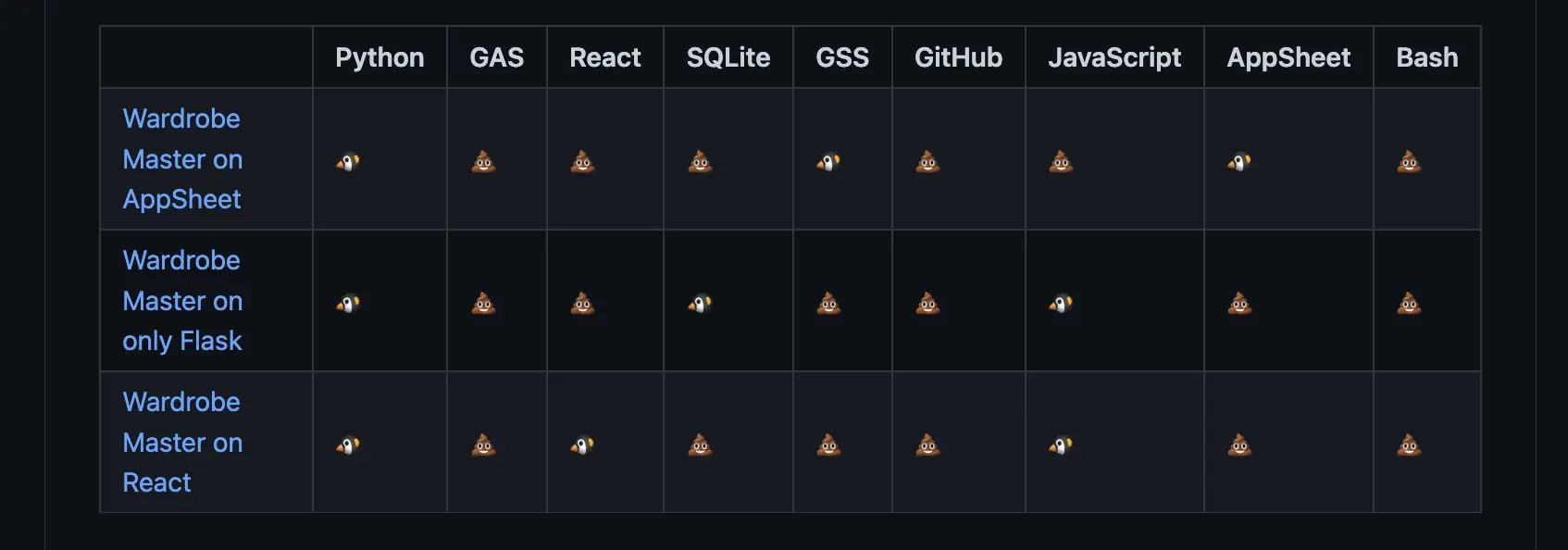
その場合は、closeByTag関数のtextReplacingIfBlankの引数に代替文字を指定するとその文字に置き換わります。デフォルトは「💩」です。
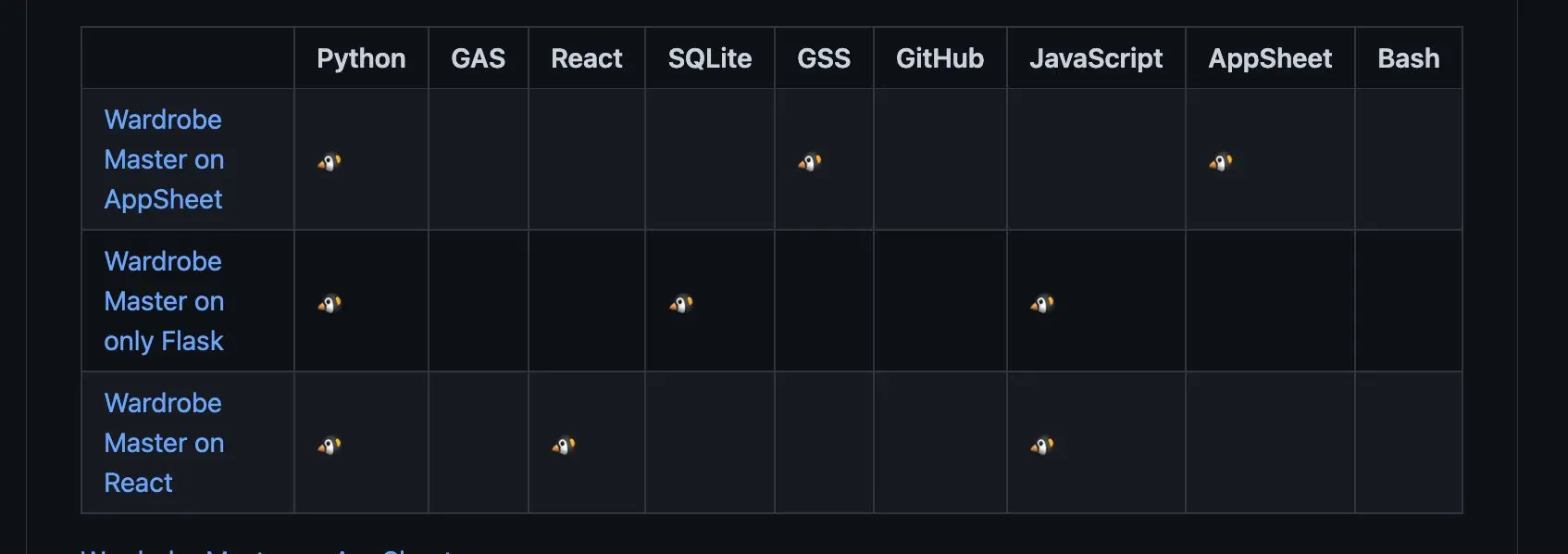
代替文字を""で指定した場合のHTMLの描画。(GitHubのリポジトリ)
代替文字を指定せずにデフォルト値の場合のHTMLの描画。(GitHubのリポジトリ)
その4:tableタグで囲む
そして、沢山生成したtrタグに対して、tableタグで囲みます。
その処理を、getHtmlByValues関数で行っています。
/** * @param {string[]} values * @param {string} textReplacingIfBlank * @return {string}*/function getHtmlByValues(values, textReplacingIfBlank="💩"){ let prefix = "<table>"; let suffix = "</table>"; let html = `${prefix}\n`; let tmp_tr = ""; let isTh = false; for(let i = 0; i < values.length; i++){ isTh = false; if(i === 0){ isTh = true; } tmp_tr = getTrByRow(values[i], isTh, textReplacingIfBlank); html += `${tmp_tr}\n`; } html += suffix; return html;}その5:出力
こちらが、今まで解説した前処理の呼び出し部分と最終的な出力部分になります。
function main(){ const values = getValuesBySelectedArea(); const html = getHtmlByValues(values, "💩"); console.log(html);}例えば、このように選択した場合に、
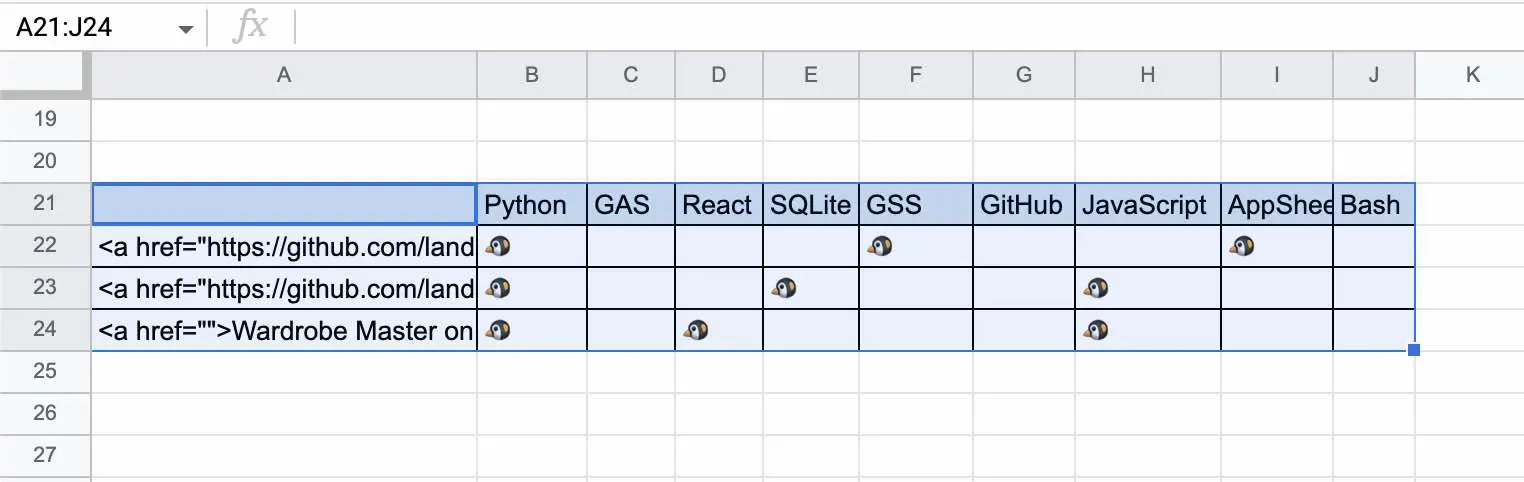
このように出力されます。
おしまい
135ml
これで、スプレッドシートで楽々編集しながら、好きな時にHTMLに変換できるなあ。
リサちゃん
うん、これは助かるなぁ!
以上になります!
記事を共有
この記事が役に立ったなら、ぜひ他の人と共有してください!
【Googleスプレッドシート、GAS】選択した範囲をHTMLのtableタグとしてテキスト出力する
https://endorphinbath.com/posts/gas-selected-area-to-html-table/ 【GAS】Google Apps Scriptで作った自作関数に対してテストコードを書けるライブラリ「TestGAS」を作りました!
【Render.com】Pythonで作成したDiscord用のボットをGitHubリポジトリからデプロイするやり方(Dockerも利用)
関連記事 スマート
1
【Googleスプレッドシート、GAS】選択した範囲をHTMLのtableタグとして画面上に出力する
Code Googleスプレッドシートで編集したセルをそのままCSVやTSVとして出力するツールを作りました。この機能を導入することによって、データの受け渡しが楽になるかと思います。
2
【GAS】Googleカレンダーに曜日を指定してスケジュールを登録するスプレッドシートの構築
Code Google Apps Scriptを使い、スプレッドシートからGoogleカレンダーに曜日指定でスケジュールを追加するシステムを作りました。繰り返し入力する版と個別に入力する版があります。
3
【Google Apps Script】自分がGASで使うIDとかトークンを1つのシートで管理するライブラリを作ろうとしたけど、断念した話
Code Google Apps Scriptで使うフォルダIDやスプレッドシートIDなどを一括管理するライブラリをスプレッドシート上で作ろうと思ったのですが、とある理由により頓挫しました。貴方もお気を付け下さい。
4
【GAS、Google Spreadsheet】Googleドキュメントで日記を付けるために毎日Docファイルを作ってくれるスクリプトです
Code GoogleDriveにあるファイルを毎日決まった時間にコピーしてくれるスクリプトを書きました。日記をつける場合に毎回ファイルをコピーしてレイアウトを変えて・・・といった作業を効率化してしまいましょう!
5
【GAS、Google Spreadsheet】Google Driveに共有したWebサイトのURLをGoogleスプシに転記する。
Code Googleドライブに共有したWebサイトのURLが載ったテキストファイルを読み込んで、Googleスプシに転記するツールを作りました。後で読みたいと思った記事を一元管理できて便利に使えています。
ランダム記事 ランダム
私のブログへようこそ!これはサンプルのお知らせです。
音楽
再生中なし
0:00 0:00
287
8
93
486,174
0 日
0 日前