








【Markdown】mermaid.jsのコードを変えて描画の変化を観察してみた
1151 語
6 分
【Markdown】mermaid.jsのコードを変えて描画の変化を観察してみた

はじまり
135ml
Mermaidをどう書くとどういうレイアウトになるのかどうかを今回の記事では観察してみたいと思います。

リサちゃん
かんさつかんさつぅ〜。目を皿にしてみました。
元のソース
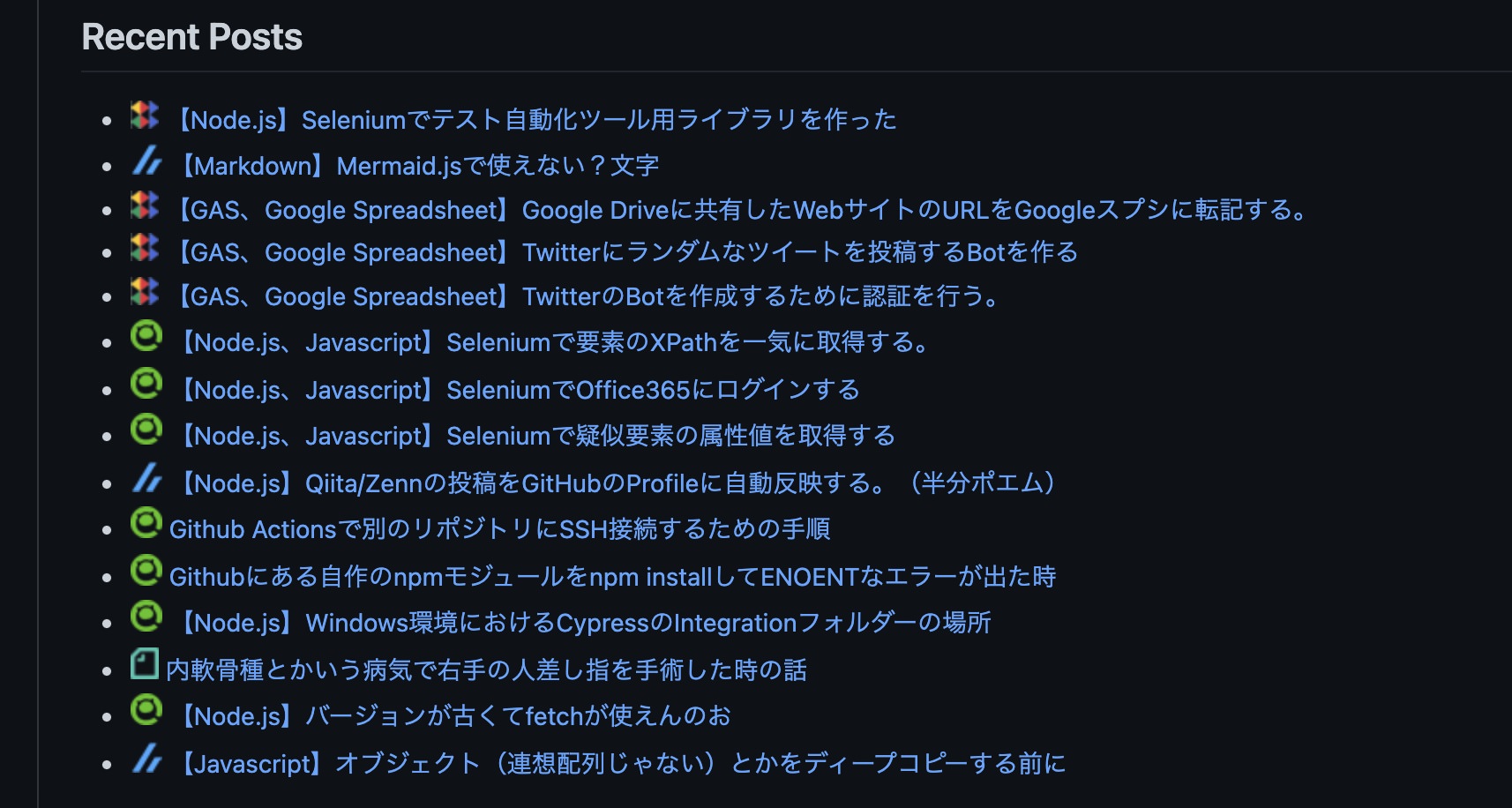
今回は、この記事で作成した概要図を作る際に使ったMermaidに関する記事になります。
 エンドルフィン風呂に浸かる。
【Node.js】GitHub ActionsでREADME.mdに投稿した記事のリンクを表示する(FirebaseでCORS対応)
Zenn、Qiita、ブログ、noteに投稿した記事のURLをREADM.mdに掲載するアプリを作成しました。このアプリを参考にして自分のGitHubのプロフィールページをカッコよくしてみましょう!GitHub ActionsやFirebaseを題材にしています。
www.endorphinbath.com
今回試すソースは、こちらになります。その下に実際に描画されるものも貼っています。
graph LR; subgraph Overview[Overview]; subgraph Landmaster135; A[fab:fa-github GitHub Actions ] B(README.md) end subgraph dev environment; I[fa:fa-laptop MacBook  ] J[fab:fa-docker Docker  ] end subgraph Firebase; K[<img src='https://simpleicons.org/icons/firebase.svg' width='20' /><br>Firebase-tools] L(<img src='https://simpleicons.org/icons/googlecloud.svg' width='20' /><br>cloud functions) end subgraph target sites; D(<img src='https://simpleicons.org/icons/zenn.svg' width='20' /><br>Zenn) E(<img src='https://simpleicons.org/icons/qiita.svg' width='20' /><br>Qiita) F(<img src='https://simpleicons.org/icons/wordpress.svg' width='20' /><br>WordPress) M(far:fa-sticky-note<br>note) end subgraph feed-fetcher: app; C[fab:fa-node feed-fetch  ] end A -->|Step2. Update| B A -->|Step1. Install app: GET| C C -->|Step1. Install app: Response| A C -->|GET| D D -->|Response <br>with feed|C C -->|GET| E E -->|Response <br>with feed|C C -->|GET| F F -->|Response <br>with feed|C C -->|GET| L L -->|Response <br>with feed|C L -->|GET| M M -->|Response <br>with feed|L C -->|clone| I I -->|build &<br> copy source| J J -->|test source| I I -->|Request<br>to deploy|K I -->|push| C K -->|deploy<br>functions| L style D fill:#ffffff,color:#000000,stroke:#000000,stroke-width:2 style E fill:#ffffff,color:#000000,stroke:#000000,stroke-width:2 style F fill:#ffffff,color:#000000,stroke:#000000,stroke-width:2 style K fill:#ffffff,color:#000000,stroke:#000000,stroke-width:2 style L fill:#ffffff,color:#000000,stroke:#000000,stroke-width:2 style M fill:#ffffff,color:#000000,stroke:#000000,stroke-width:2 linkStyle 0 stroke:#ee3,stroke-width:4px linkStyle 1 stroke:#ee3,stroke-width:4px linkStyle 2 stroke:#ee3,stroke-width:4px end style Overview fill:#3c4451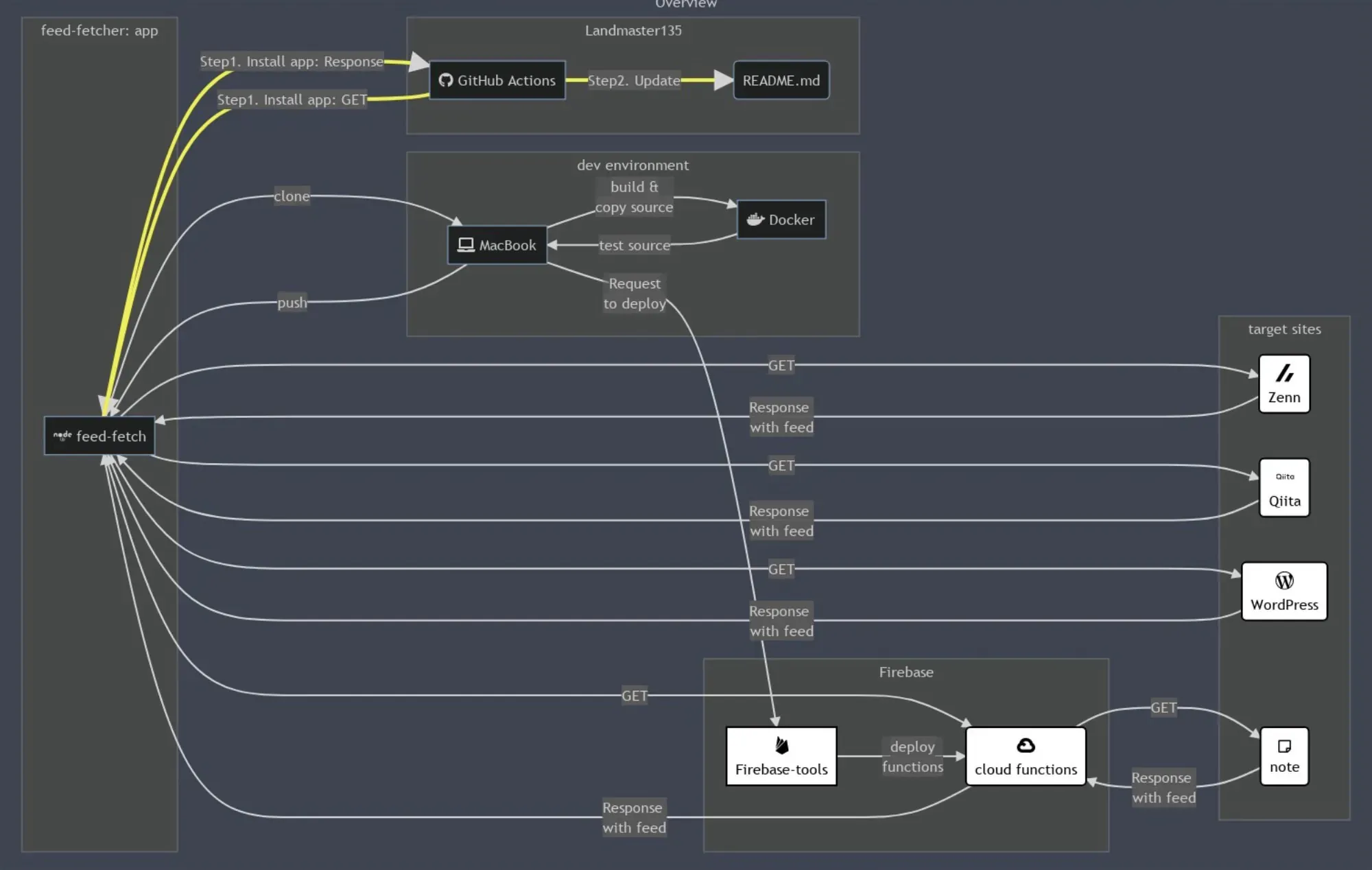
試験1
このソースは、元のソースからdev environmentとLandmaster135を入れ替えました。この場合は、入れ替えた2つが上下で入れ替わりました。
graph LR; subgraph Overview[Overview]; subgraph dev environment; I[fa:fa-laptop MacBook  ] J[fab:fa-docker Docker  ] end # ↑↓dev environmentとLandmaster135を入れ替えた。 subgraph Landmaster135; A[fab:fa-github GitHub Actions ] B(README.md) end subgraph Firebase; K[<img src='https://simpleicons.org/icons/firebase.svg' width='20' /><br>Firebase-tools] L(<img src='https://simpleicons.org/icons/googlecloud.svg' width='20' /><br>cloud functions) end subgraph target sites; D(<img src='https://simpleicons.org/icons/zenn.svg' width='20' /><br>Zenn) E(<img src='https://simpleicons.org/icons/qiita.svg' width='20' /><br>Qiita) F(<img src='https://simpleicons.org/icons/wordpress.svg' width='20' /><br>WordPress) M(far:fa-sticky-note<br>note) end subgraph feed-fetcher: app; C[fab:fa-node feed-fetch  ] end # 略...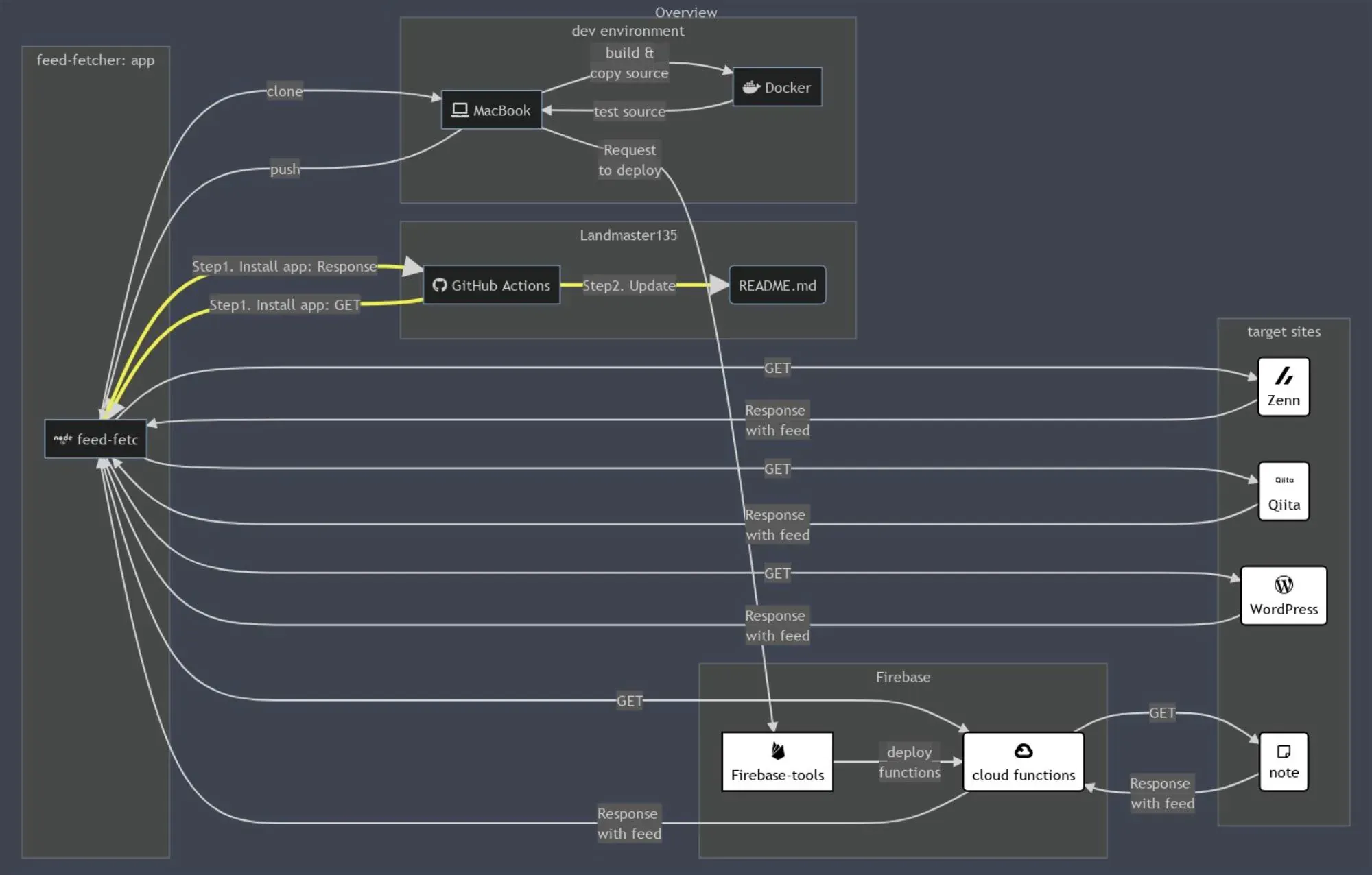
試験2
このソースは、元のソースからfeed-fetcher: appとtarget sitesを入れ替えました。この場合は、target sitesが下に移動しました。
graph LR; subgraph Overview[Overview]; subgraph Landmaster135; A[fab:fa-github GitHub Actions ] B(README.md) end subgraph dev environment; I[fa:fa-laptop MacBook  ] J[fab:fa-docker Docker  ] end subgraph Firebase; K[<img src='https://simpleicons.org/icons/firebase.svg' width='20' /><br>Firebase-tools] L(<img src='https://simpleicons.org/icons/googlecloud.svg' width='20' /><br>cloud functions) end subgraph feed-fetcher: app; C[fab:fa-node feed-fetch  ] end # ↑↓feed-fetcher: appとtarget sitesを入れ替えた。 subgraph target sites; D(<img src='https://simpleicons.org/icons/zenn.svg' width='20' /><br>Zenn) E(<img src='https://simpleicons.org/icons/qiita.svg' width='20' /><br>Qiita) F(<img src='https://simpleicons.org/icons/wordpress.svg' width='20' /><br>WordPress) M(far:fa-sticky-note<br>note) end # 略...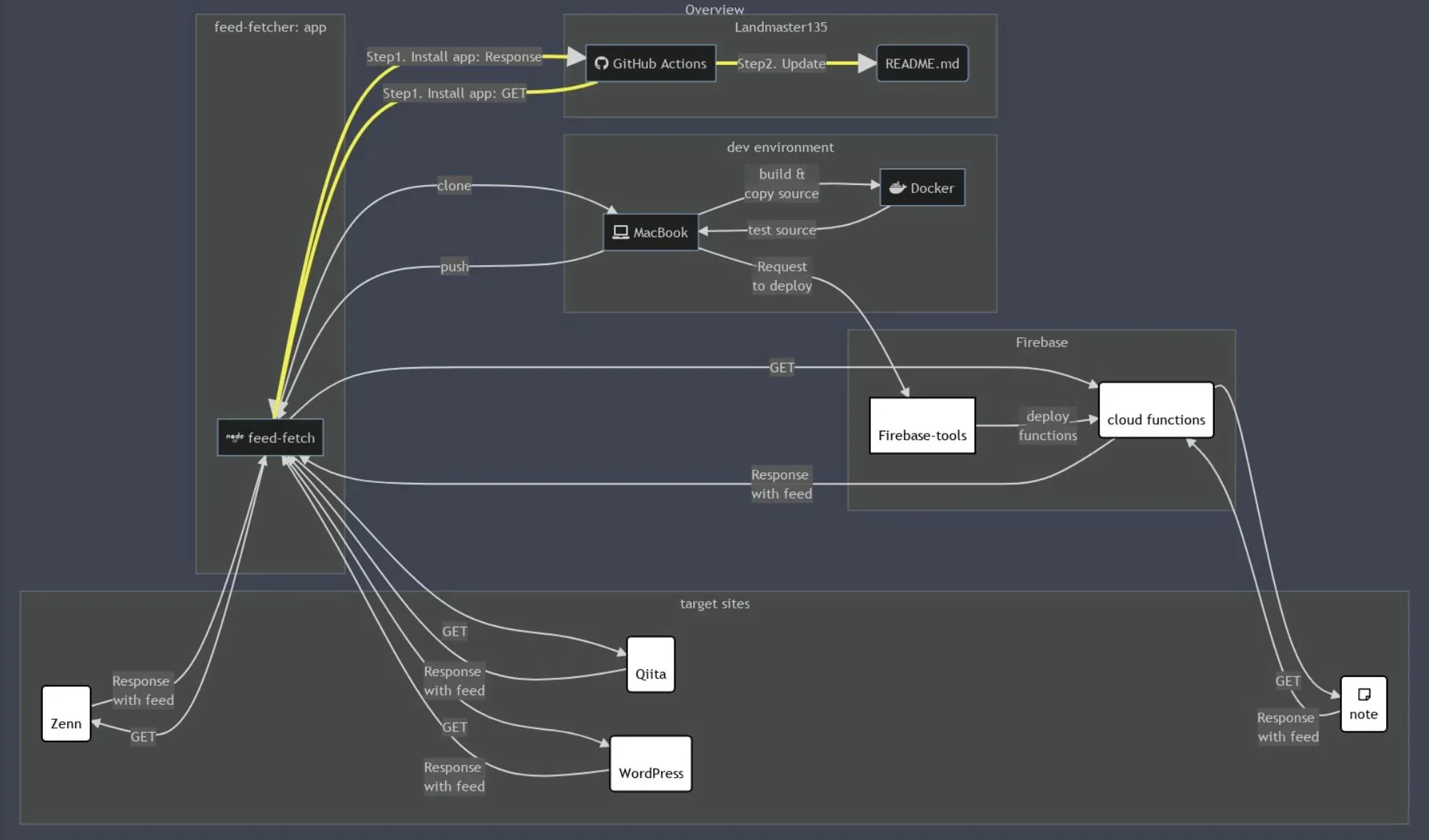
試験3
このソースは、元のソースからFirebaseとtarget sitesを入れ替えました。表示に変化はありません。
graph LR; subgraph Overview[Overview]; subgraph Landmaster135; A[fab:fa-github GitHub Actions ] B(README.md) end subgraph dev environment; I[fa:fa-laptop MacBook  ] J[fab:fa-docker Docker  ] end subgraph target sites; D(<img src='https://simpleicons.org/icons/zenn.svg' width='20' /><br>Zenn) E(<img src='https://simpleicons.org/icons/qiita.svg' width='20' /><br>Qiita) F(<img src='https://simpleicons.org/icons/wordpress.svg' width='20' /><br>WordPress) M(far:fa-sticky-note<br>note) end # ↑↓ Firebaseとtarget sitesを入れ替えた。 subgraph Firebase; K[<img src='https://simpleicons.org/icons/firebase.svg' width='20' /><br>Firebase-tools] L(<img src='https://simpleicons.org/icons/googlecloud.svg' width='20' /><br>cloud functions) end subgraph feed-fetcher: app; C[fab:fa-node feed-fetch  ] end # 略...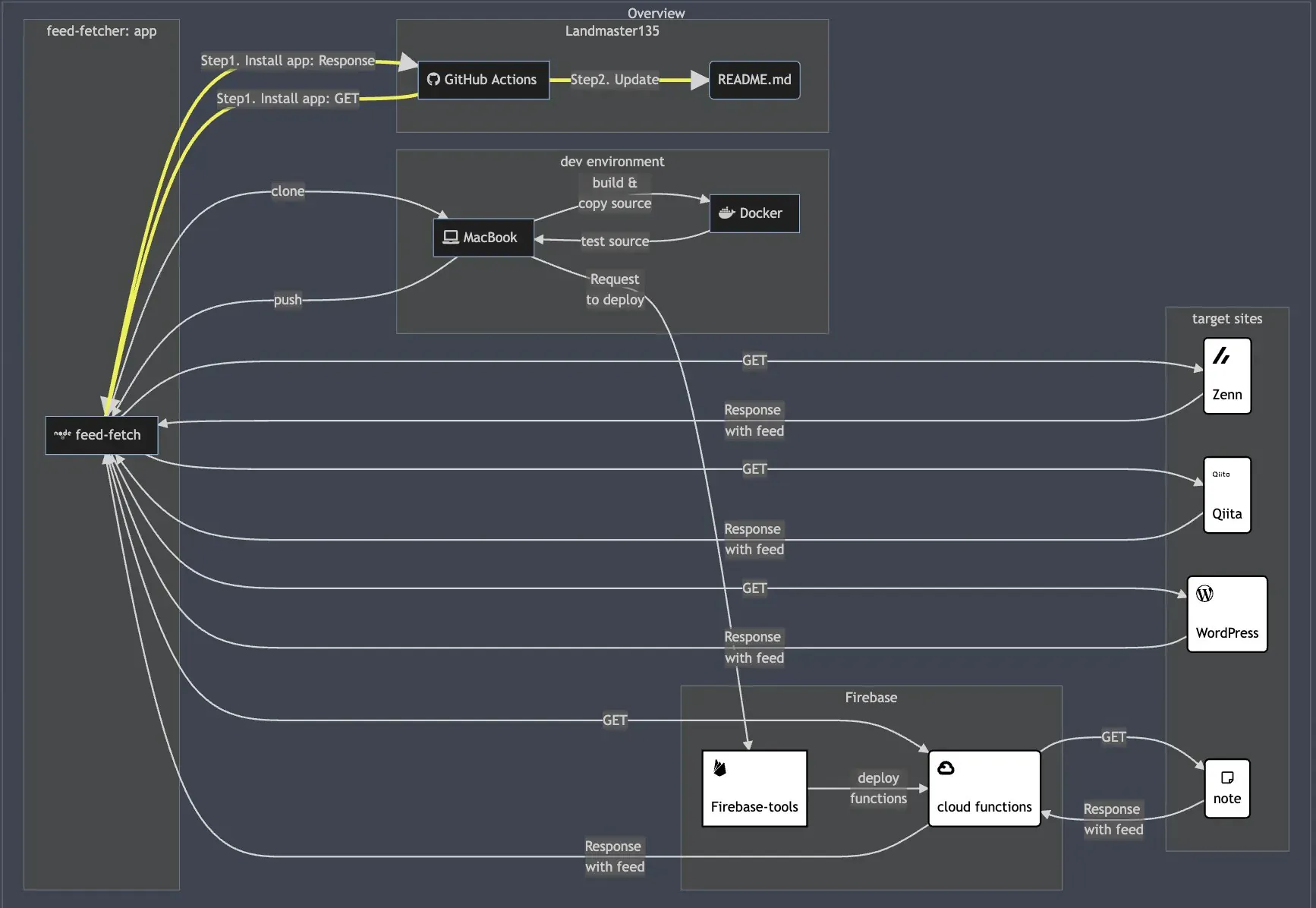
試験4
このソースは、元のソースからtarget sitesを一番上に持ってきました。これも描画内容は変わりません。
graph LR; subgraph Overview[Overview]; subgraph target sites; D(<img src='https://simpleicons.org/icons/zenn.svg' width='20' /><br>Zenn) E(<img src='https://simpleicons.org/icons/qiita.svg' width='20' /><br>Qiita) F(<img src='https://simpleicons.org/icons/wordpress.svg' width='20' /><br>WordPress) M(far:fa-sticky-note<br>note) end subgraph Landmaster135; A[fab:fa-github GitHub Actions ] B(README.md) end subgraph dev environment; I[fa:fa-laptop MacBook  ] J[fab:fa-docker Docker  ] end subgraph Firebase; K[<img src='https://simpleicons.org/icons/firebase.svg' width='20' /><br>Firebase-tools] L(<img src='https://simpleicons.org/icons/googlecloud.svg' width='20' /><br>cloud functions) end subgraph feed-fetcher: app; C[fab:fa-node feed-fetch  ] end # 略...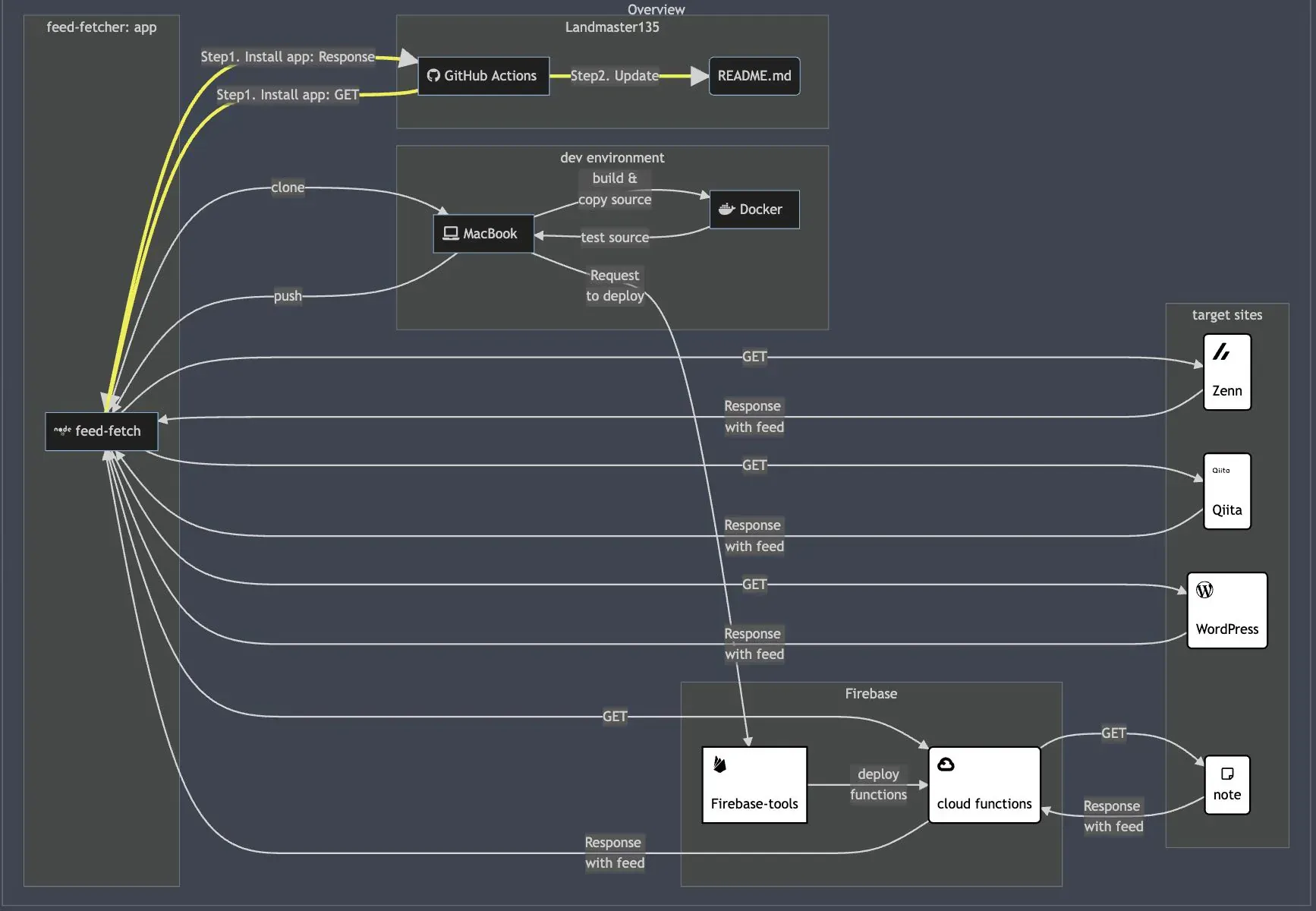
試験5
このソースは、元のソースからコーディングするsubgraphを逆順にしたものです。Landmaster135が最下段に移動しています。
graph LR; subgraph Overview[Overview]; subgraph feed-fetcher: app; C[fab:fa-node feed-fetch  ] end subgraph target sites; D(<img src='https://simpleicons.org/icons/zenn.svg' width='20' /><br>Zenn) E(<img src='https://simpleicons.org/icons/qiita.svg' width='20' /><br>Qiita) F(<img src='https://simpleicons.org/icons/wordpress.svg' width='20' /><br>WordPress) M(far:fa-sticky-note<br>note) end subgraph Firebase; K[<img src='https://simpleicons.org/icons/firebase.svg' width='20' /><br>Firebase-tools] L(<img src='https://simpleicons.org/icons/googlecloud.svg' width='20' /><br>cloud functions) end subgraph dev environment; I[fa:fa-laptop MacBook  ] J[fab:fa-docker Docker  ] end subgraph Landmaster135; A[fab:fa-github GitHub Actions ] B(README.md) end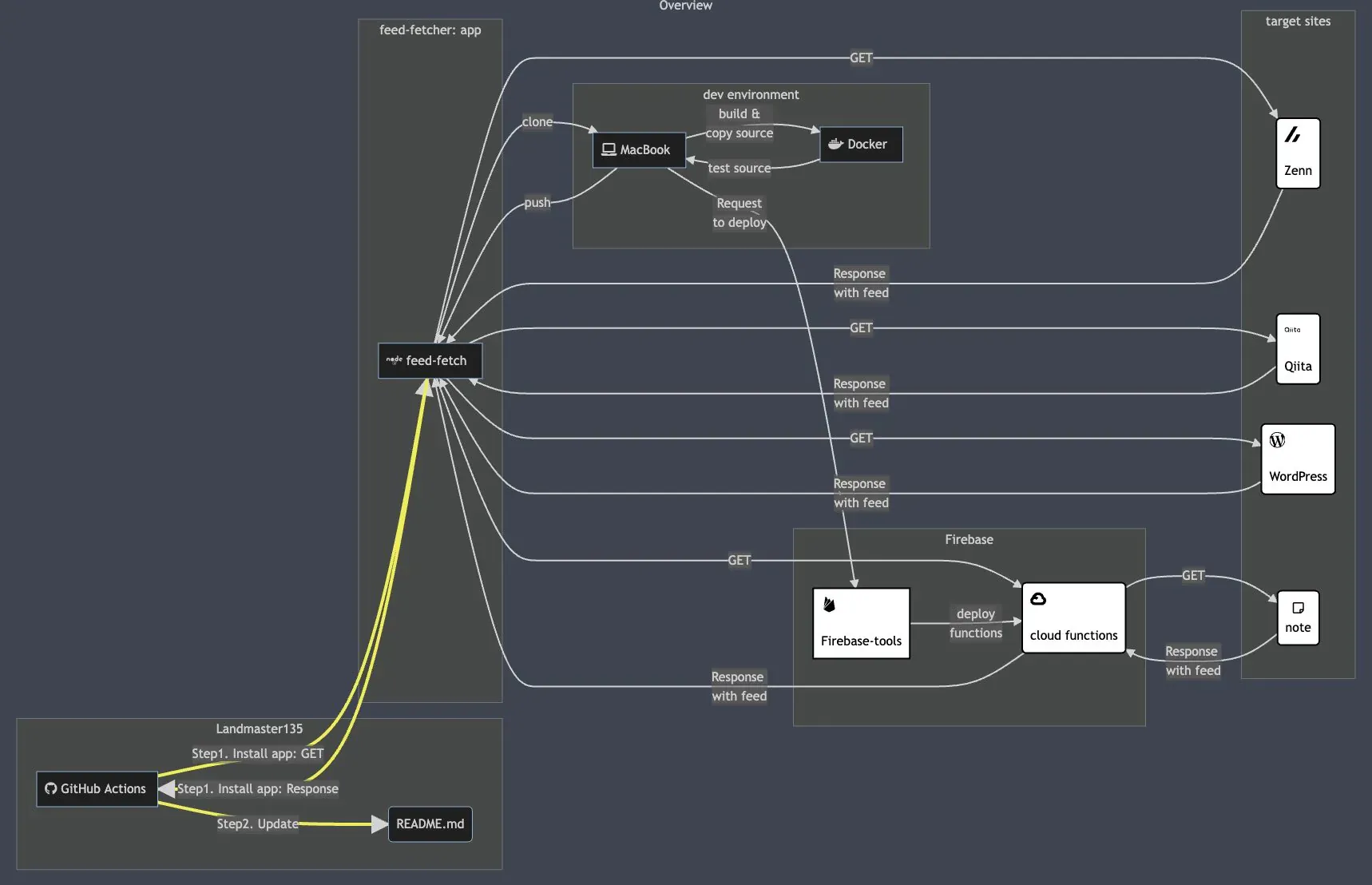
おさらい(描画ロジックの予測)
ここまで観察してみて、graph LR;を描画する際の描画ロジックが以下のようになっていると予測しています。
- 上に書かれている
subgraphは、下に書かれているsubgraphの上に描画される。→ コード順のロジック subgraphA、subgraphB、subgraphCとsubgraphDがある場合、BがAより下でも、それらの上に描画されているDとCについて、DがCより下であり、BがCのみ結合し、AがCとDに結合している場合、BはAよりも上に描画される。→ 結合してるgraphのコード順ロジック
結合してるgraphのコード順ロジックは、図示するとこんな感じです。
graph LR; subgraph Overview[Overview]; subgraph C; C1[<img src='https://simpleicons.org/icons/firebase.svg' width='20' /><br>Firebase-tools] C2(<img src='https://simpleicons.org/icons/googlecloud.svg' width='20' /><br>cloud functions) end subgraph D; D1[fa:fa-laptop MacBook  ] end subgraph A; A1[fab:fa-node feed-fetch  ] A2[fab:fa-node feed-fetch  ] end subgraph B; B1(<img src='https://simpleicons.org/icons/zenn.svg' width='20' /><br>Zenn) end A1 --> C1 B1 --> C1 A1 --> D1 end # 略...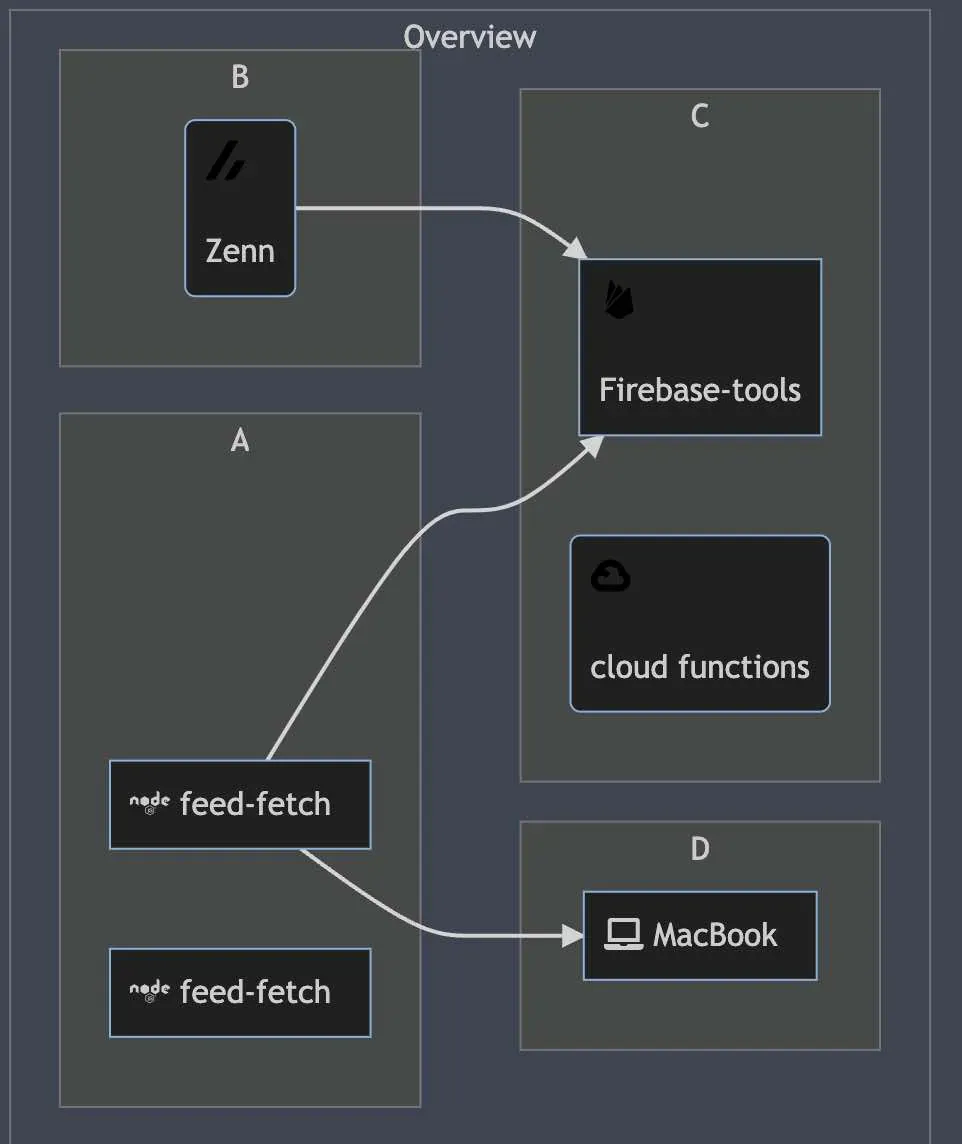
しかし、以下のように書き換えると、描画が結合してるgraphのコード順ロジック」と違います。どうやら、結合する子要素の順番もロジックに入るようです。→ 子要素のコード順のロジック
graph LR; subgraph Overview[Overview]; subgraph C; C1[<img src='https://simpleicons.org/icons/firebase.svg' width='20' /><br>Firebase-tools] C2(<img src='https://simpleicons.org/icons/googlecloud.svg' width='20' /><br>cloud functions) end subgraph D; D1[fa:fa-laptop MacBook  ] end subgraph A; A1[fab:fa-node feed-fetch  ] A2[fab:fa-node feed-fetch  ] end subgraph B; B1(<img src='https://simpleicons.org/icons/zenn.svg' width='20' /><br>Zenn) end A1 --> C1 B1 --> C2 // ここをC1→C2に書き換えた。 A1 --> D1 end # 略...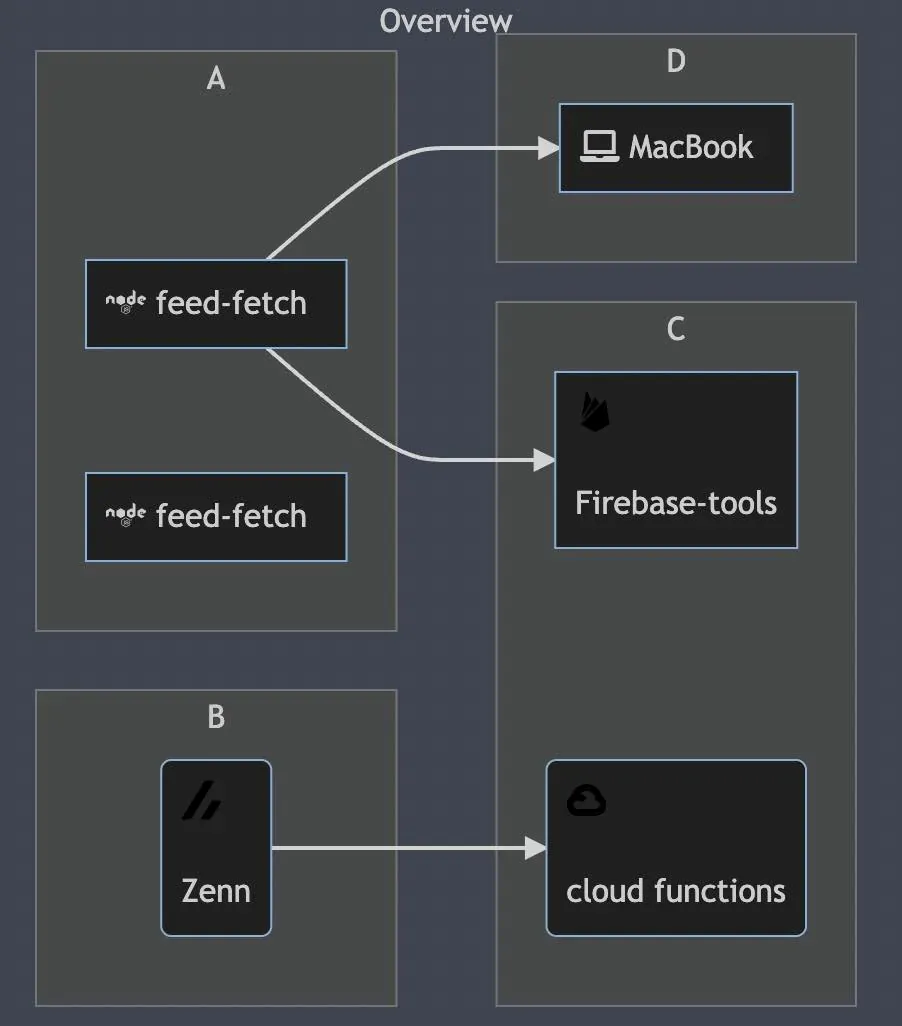
おしまい
135ml
ある程度、挙動は掴めたかな?
リサちゃん
まあ、graph LR;の挙動は大体。目を皿にしてみました。
以上になります!
記事を共有
この記事が役に立ったなら、ぜひ他の人と共有してください!
【Markdown】mermaid.jsのコードを変えて描画の変化を観察してみた
https://endorphinbath.com/posts/mermaid-drawing-variation-by-code/ 【VSCode】Pythonのimport文の順番が勝手に入れ替わらないようにする(editor.formatOnPasteを使用)
【Node.js】Markdown内のimgタグの画像の大きさを変える
関連記事 スマート
1
今年食ったサバ缶のまとめ(2025年版:後編)
Mackerel 2025年に筆者が食べたサバ缶、イワシ缶、サンマ缶などを紹介します。個人的な美味しさ、DHAおよびEPAの含有量の目安なども掲載しています。
2
今年食ったサバ缶のまとめ(2025年版:前編)
Mackerel 2025年に筆者が食べたサバ缶、イワシ缶、サンマ缶などを紹介します。個人的な美味しさ、DHAおよびEPAの含有量の目安なども掲載しています。
3
【Cloud Scheduler】コンテナを動かすために必要なgcloudコマンドをシェル関数化する
Code Google Cloud上でデプロイされたコンテナを操作するためにシェル関数を構築します。その関数には処理が完了した時やエラー発生時に通知を行ったりヘルプ機能も実装します。
4
【Google Cloud】GitHub Actionsで認証するためのシェル関数を作る
Code Google Cloud上のリソースを使ってGitHub ActionsでCI/CDするためにシェル関数を構築します。その関数ではサービスアカウントにWorkload Identity連携をして処理の途中に通知を行ったりもします。
5
【Cloud Run】コンテナを稼働させるまでに必要なgcloudコマンドをシェル関数化する
Code Google Cloud上でコンテナをデプロイするためにシェル関数を構築します。その関数には処理が完了した時やエラー発生時に通知を行ったりヘルプ機能も実装します。
ランダム記事 ランダム
私のブログへようこそ!これはサンプルのお知らせです。
音楽
再生中なし
0:00 0:00
287
8
93
486,174
0 日
0 日前